
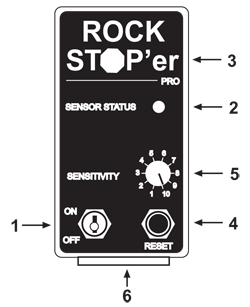
 1. On/Off Toggle Type Power Switch
- Turns the Rock Stop'er system "on" or "off"
2. Sensor Status LED Light
- GREEN LIGHT
- Indicates the power switch is "ON"
- Indicates the sensor circuit is "OK"
- NO LIGHT
- Indicates the power switch is "OFF" or
- Fault with RSCM power or ground connections
- FLASHING GREEN/RED
- Indicates the sensor is disconnected, or
- Fault with sensor circuit wiring (also occurs during a detection)
3. Red Stop Light
- Flashing ON and OFF with beeping = DETECTION! (the sensor has been tripped)
4. Reset - Push Button Switch
- After the sensor has tripped the Red Stop Light (3) is flashing along with a beeping sound. Press the reset button (4) to acknowledge the detection. Then reverse the feed drive to reset the forager stop system as would normally be done after a metal detection. Shut off the main drive and wait for all moving parts to stop before searching for the detected stone(foreign object) in the feedroll area.
- Reset button (4) is also used to enter Control Signal Program Mode (see Operators Manual)
5. Sensitivity Adjustment Dial
- Adjusts the RSCM sensitivity to the RSS (sensor) signal
- 10 = Most Sensitive-any signal from the sensor will cause a detection
- 1 = Least Sensitive
- See Operators Manual for more information on sensitivity settings
6. RSCM Wiring Harness Connector
- see Operators Manual for harness / connector terminal identification